
Frontend Secrets: The Good, The Bad, and The Exposed
If you’ve ever pushed an API key to GitHub, struggled to configure different settings for development and production, or wondered why your “secret” environment variable was visible in the browser, you’re not alone. The line between public configuration and private secrets in frontend applications is notoriously blurry.
In this comprehensive guide, we will demystify frontend environment variables once and for all. You will learn not just how to use them, but when and why, with a sharp focus on security. We’ll cover:
- The Critical Distinction: What constitutes a true “secret” vs. public configuration in a frontend context.
- The
.envFile Deep Dive: A clear checklist of what belongs in your.envfile and what absolutely does not. - Framework-Specific Rules: How
NEXT_PUBLIC_andVITE_prefixes actually work under the hood in Next.js and Vite. - The Build-time vs. Runtime Myth: Understanding when your environment variables are baked in and when they can be dynamic.
- Secure Architectural Patterns: How to protect your sensitive keys and API secrets by leveraging backend proxies.
By the end of this article, you’ll be able to configure your frontend applications with confidence, ensuring your secrets stay secret and your app runs flawlessly across every environment.
Variables That Belong in .env
You should store configuration values that:
- May differ between environments
- Should not be hardcoded
- Are sensitive (e.g., secrets, tokens) or environment-dependent (e.g., API URLs)
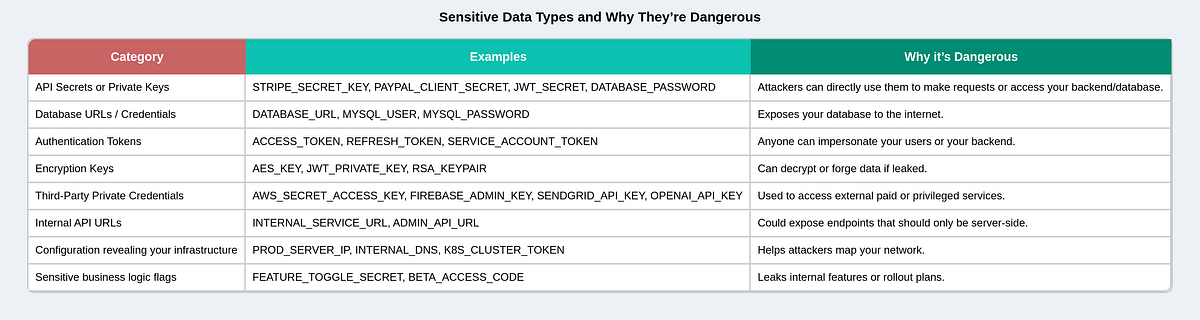
1. API Keys & Secrets (server-side only)
Example:
DATABASE_URL=postgres://user:password@host:port/dbname
JWT_SECRET=my_super_secret_key
STRIPE_SECRET_KEY=sk_live_123456789
⚠️ In Next.js, these should not be prefixed with
NEXT_PUBLIC_, since that would expose them to the browser.
These are only accessible in server-side code (API routes
getServerSideProps, etc.).
What is sensitive data or a secret?
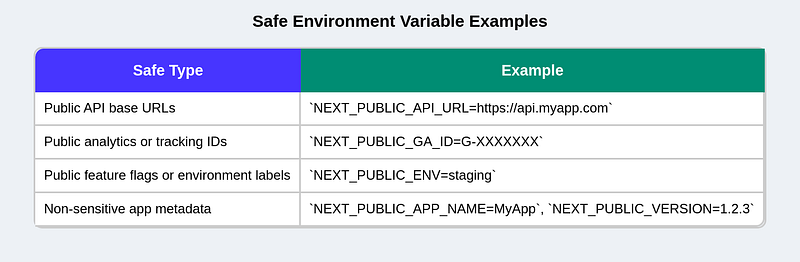
2. Public Environment Variables (client-side)
Example:
NEXT_PUBLIC_API_URL=https://api.example.com
NEXT_PUBLIC_GOOGLE_ANALYTICS_ID=G-12345678
Anything that needs to be used in the browser must start with
NEXT_PUBLIC_(for Next.js). For React (Vite App), prefix it withVITE_.
What is public or not-sensitive data?
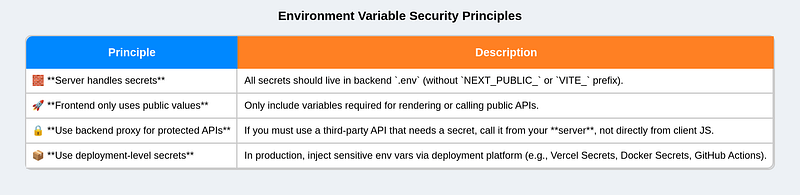
In a nutshell, we separate environment variables based on their sensitivity level
3. Environment Configuration
Values that differ per environment:
NODE_ENV=development
APP_ENV=staging
PORT=3000
LOG_LEVEL=debug
4. Third-party Configs or Feature Flags
For toggling optional features:
ENABLE_NEW_UI=true
SENTRY_DSN=https://sentry.io/abc123
Environment File Conventions (modes)
-
.env- Purpose: base defaults for every environment.
- Commit? Usually yes if it contains non-sensitive defaults.
-
.env.local- Purpose: machine-specific overrides (secrets, local DB URLs).
- Commit? No — add to
.gitignore.
-
.env.development/.env.production/.env.test- Purpose: mode-specific values. Loaded when the corresponding mode/env is active.
- Commit? Usually yes for non-secrets.
-
.env.development.local,.env.production.local,.env.test.local-
Purpose: mode-specific local overrides (highest priority for that mode).
-
Commit? No.
-
Loading priority (common rule)
.env(lowest)- mode file:
.env.[mode](e.g.,.env.production) .env.local.env.[mode].local(highest)
How to share a secret?
When we add our env file into .gitignore, it may contain private keys, URLs, or tokens that should never be in GitHub. But of course, other developers still need these values to run the app locally. So how do we handle this?
1. Create an example file
You include a file like:
.env.exampleIt looks like this:
NEXT_PUBLIC_API_URL=https://dev.api.example.com
API_KEY=your_api_key_here
👉 Developers copy it and rename it:
cp .env.example .envThen fill in their own real values.
2. Use team secret sharing
For sensitive keys (like API keys), teams usually share them outside of Git:
- Private Slack/Teams channel
- Password manager (like 1Password, Bitwarden)
- Company secret manager (like AWS Secrets Manager, Doppler, or Vault)
3. Platform or CI/CD handles it
In production, you don’t need to share the .env at all —
Vercel, Netlify, or GitHub Actions store them securely in their dashboard settings.
When you deploy, those values automatically load.
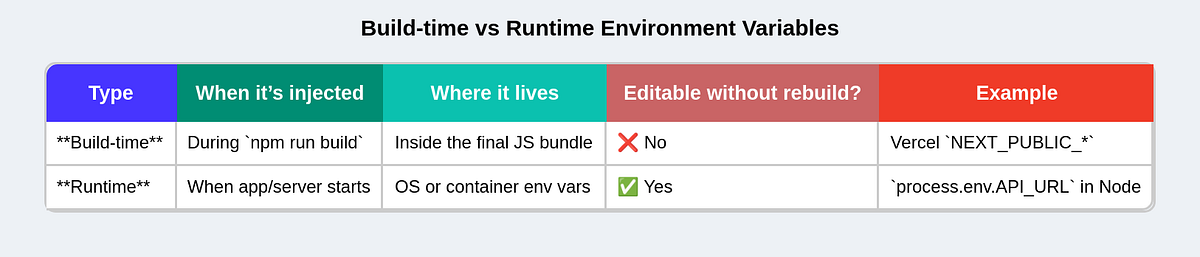
Build-time vs. Runtime Environment Variables
Let’s start simple:
- Build-time envs
- values baked into your JS when you run
npm run build. - Once deployed, changing them does nothing unless you rebuild.
2. Runtime envs
- values provided when the app actually starts running on the server.
- You can change them without rebuilding your code.
Where Runtime Env Injection Matters
Runtime envs are only useful if your app runs in a server environment like:
Next.js server mode (app router or API routes)
- Node.js backend
- Docker container
- Kubernetes Pod
- Serverless platforms (Vercel, Netlify, Cloudflare)
In pure static builds (e.g., Vite + static hosting like GitHub Pages), there is no runtime — everything is just files. So envs must be baked in at build time.
In a nutshell:
Best Practices and recap
- Never commit
.envfiles with secrets — add them to.gitignore. - Keep separate
.envfiles for dev, staging, and prod. - Use
.env.localfor machine-specific secrets. - Always prefix browser-exposed vars properly (
NEXT_PUBLIC_orVITE_). - Use environment managers (like Vercel, Docker, or GitHub Secrets) for deployment instead of pushing
.envfiles. - Always document your environment variables with comments or in a sample
.env.examplefile for team reference. - Include fallback values when accessing env variables to prevent crashes if they’re missing.
- Add type definitions for your environment variables to make their usage type-safe.
- Be consistent with your naming convention.