
Enterprise-Grade Error Handling in Frontend Applications
“Good engineers write code that works. Great engineers design systems that fail gracefully.” In the frontend world, failure is not an edge case — it’s a constant. Network hiccups, expired sessions, misconfigured APIs, or third-party SDK issues can all disrupt the user experience. This article dives deep into how to **treat errors as first-class citizens** in your architecture — exploring strategies to classify, observe, and recover from failures without losing user trust.
Error classification and why it matters
Classifying errors helps decide how to handle them (retry, show a message, degrade UI, block, report).
- Network / API errors
- Examples: DNS failure, 502/503/500 responses, timeout, interrupted request.
- How to treat: treat as potentially transient; consider retry/backoff; map server codes to user-friendly messages.
- Client runtime / rendering errors
- Examples:
TypeError: cannot read property 'foo' of undefinedin a component. - How to treat: catch with error boundaries, show fallback UI, collect stack trace.
- Examples:
- Validation / user input errors
- Examples: submitting a form with an invalid email or missing required field.
- How to treat: prevent submission, show inline validation messages.
- Auth / permission errors
- Examples: 401 Unauthorized, 403 Forbidden.
- How to treat: prompt re-login, refresh token, or redirect to login.
- Third-party & SDK errors
- Examples: analytics SDK failing, payment gateway error.
- How to treat: isolate, degrade non-critical features, report to vendor logs if possible.
- Configuration / environment errors
- Examples: missing API key, bad env var.
- How to treat: fail fast in dev, log clearly, show admin-only error or fallback.
but in Enterprises often classify errors by severity and impact:
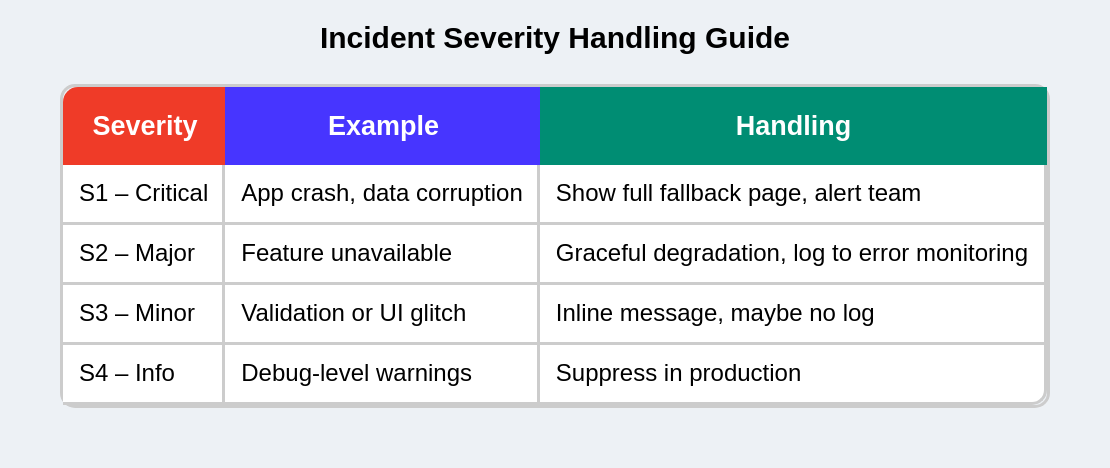
This allows better alert routing and noise reduction in monitoring tools.
Core Principles and Examples
1. Differentiate expected vs unexpected errors
Principle: Handle predictable, repeatable errors differently from unexpected crashes.
- Expected: validation failures, 404s, rate-limiting — these should result in predictable user flows and messages.
- Unexpected: runtime exceptions, null dereferences — these require logging, developer investigation, and possibly a broad fallback.
2. Centralize error handling
Principle: Avoid try/catch everywhere — create a small centralized error manager/service.
Why: Easier to standardize messages, attach insights (user id, route, app version), and swap logging backends.
Example ErrorService (TypeScript sketch):
// ErrorService.ts
export interface ErrorPayload {
  message: string;
  code?: string;
  status?: number;
  url?: string;
  userId?: string;
  extra?: Record<string, any>;
  stack?: string;
}

export const ErrorService = {
  report: (payload: ErrorPayload) => {
    // localConsole; then send to Sentry / analytics
    console.error('[ErrorService]', payload);
    // POST to your logging endpoint or SDK
    // Sentry.captureException(...) etc.
  },
};
Usage
try {
  await api.updateProfile(data);
} catch (err) {
  ErrorService.report({ message: err.message, status: err.status, url: '/api/profile' });
  showToast('Could not update profile. Please try again.');
}
Centralizing error handling involves three main approaches:
I. Single API fetcher
Wrap fetch/axios to standardize response parsing and error normalization.
// fetcher.ts
export async function fetcher(input: string, init?: RequestInit) {
  const res = await fetch(input, init);
  const text = await res.text();
  let data;
  try {
    data = JSON.parse(text);
  } catch {
    data = text;
  }
  if (!res.ok) {
    const apiError = {
      status: res.status,
      message: data?.message || res.statusText,
      data,
    };
    throw apiError; // normalized shape
  }
  return data;
}
Use this in UI code consistently (React Query, SWR, custom hooks).
II. Global error boundary + local boundaries
- Global Error Boundary: catches anything uncaught and shows a global fallback or reload option.
- Local Error Boundaries: wrap riskier parts (rich editors, charts) to avoid entire app crash.
Example:
<GlobalErrorBoundary>
  <Header />
  <ErrorBoundary fallback={<WidgetFallback />}>
    <Dashboard />
  </ErrorBoundary>
  <Footer />
</GlobalErrorBoundary>
III. Centralized toast / notification manager
All user-facing transient messages go through one service:
toastService.show({ type: 'error', title: 'Could not save', action: { label: 'Retry', onClick: retryFn } });This enforces consistent language and placement.
3. Design User-Friendly Error Experiences
Principle: Error messages should be actionable, polite, and non-technical, with appropriate UX patterns for different error types.
Message Guidelines
✅ Dos
- Use plain language: "We couldn't save changes. Try again."
- Provide clear actions: "Retry", "Save draft", "Contact support"
- Be specific but non-technical
❌ Don'ts
- Never show raw backend error messages with internal details
- Avoid generic messages like "Something went wrong"
- Don't expose stack traces, internal IDs, or secrets
Practical UX Patterns
1. Inline Validation & Form Errors
- Show validation text directly under the relevant field
- Keep it contextual - don't use toasts for validation errors
- Example:
- Field:
Email - Error:
Please enter a valid email address (example@domain.com)
- Field:
2. Smart Toasts for Transient Errors
- Use for temporary issues like network problems
- Show progress: "Network lost — retrying in 3s" with spinner
- Escalate after failures: "Offline — changes will be saved when connection returns"
3. Fallback Pages for Critical Failures
For app-level crashes, show a full-page fallback with:
- Clear explanation: "Something went wrong"
- Primary CTA: "Reload" button
- Secondary options: "Try in Incognito", "Report issue" link
4. Message Templates by Error Type
- Transient network: "Connection issue — retry"
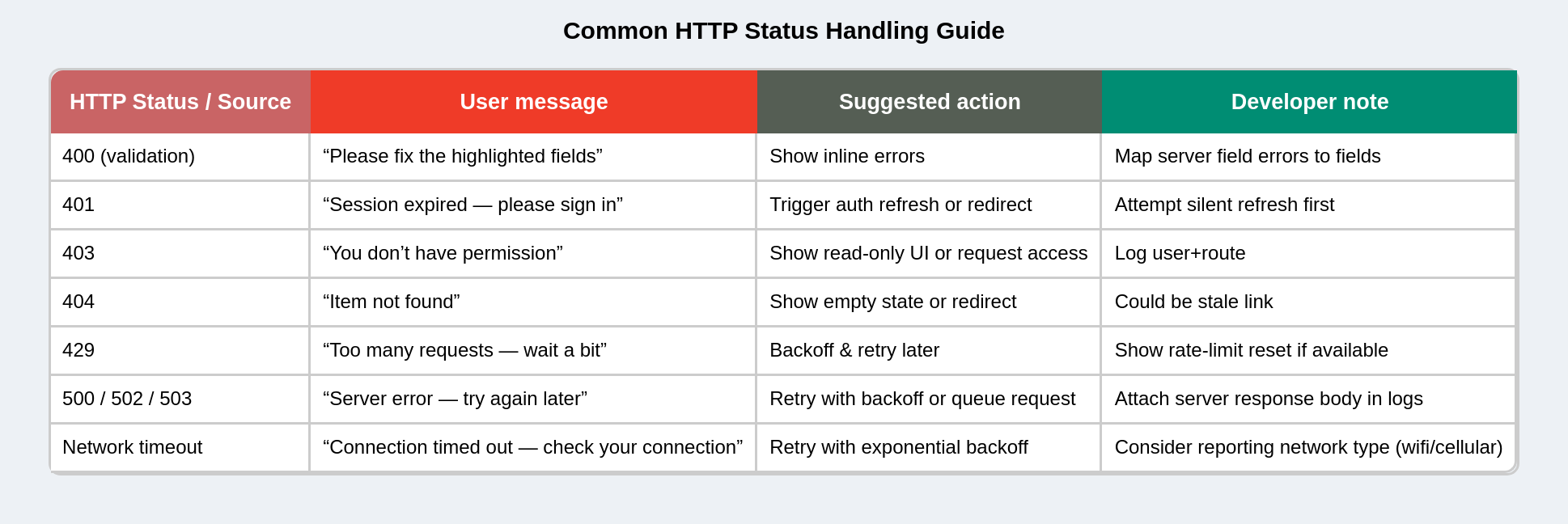
- Server errors: "We're having trouble saving your changes. Please try again later."
- Validation: "This field must be a valid email address."
- Authentication: "Your session expired. Please sign in again."
5. Internationalization (i18n)
- Map server error codes to translation keys, not raw text
- Example:
- Server:
{ code: "PAY_001_TIMEOUT" } - Frontend:
t("errors.PAY_001_TIMEOUT") → "زمان پرداخت به پایان رسیده!"
- Server:
- Ensures legal compliance and global user support
This approach ensures users get the right level of information and actionable steps for every error scenario.
Example error message mapping (practical table)
Documentation & Error Dictionary
Maintain a shared “Error Dictionary” across teams:
- Code → Message → Recovery suggestion → Owner service
Example:
Code Message Recovery Owner AUTH_401_EXPIREDSession expired Refresh or login Auth Service PAY_001_TIMEOUTPayment timeout Retry Payment Service DATA_404_ITEM_NOT_FOUNDItem not found Refresh page Data Service
This allows non-technical teams (support, QA) to understand issues quickly.
4. Fail gracefully
Principle: The app should remain usable even if parts fail.
Why: A single failing component shouldn’t crash the whole app or prevent users from doing other tasks.
Example UI behavior
- If a sidebar widget fails to load, show a small card:
- Title: “Activity — unavailable”
- Body: “We couldn’t load recent activity. Try again.” + “Retry” button.
- Keep main content accessible.
Code sketch (pseudo-logic):
// Pseudocode: render fallback instead of crash
<ErrorBoundary fallback={<WidgetFallback />}>
  <ActivityWidget />
</ErrorBoundary>
5. Observe & instrument — logs, metrics and SLOs to track
Principle: You can’t fix what you can’t see. Capture enough context to reproduce errors.
What to capture
- Error message and stack trace
- Error rate (%): errors per 1k requests or per user session.
- Crash-free sessions: % sessions without runtime exceptions.
- Time-to-recover: median time from error spike to fix/deploy.
- Top error types: grouped by message/code.
- Users affected: how many unique users hit a specific error.
- Current route/path and component tree (breadcrumbs)
- User ID (anonymized or hashed) and app version
- Recent actions (clicks, API calls)
- Network status and exact request/response (avoid PII-Personally Identifiable Information or secrets)
Example payload for Sentry-like service
{
  "message": "TypeError: x is undefined",
  "stack": "...",
  "user": { "id": "u_1234" },
  "route": "/checkout",
  "timestamp": "2025-10-15T09:00:00Z",
  "breadcrumbs": [
    { "type": "http", "category": "api.payment", "message": "POST /api/pay 500" },
    { "type": "ui", "category": "button", "message": "Clicked Pay" }
  ],
  "tags": { "appVersion": "1.2.3", "env": "production" }
}
Observability Stack Integration
Connect your frontend to enterprise observability tools:
| Tool | Purpose |
|---|---|
| Sentry / New Relic / Datadog | Client-side exception tracking |
| ELK (Elasticsearch, Logstash, Kibana) | Centralized log ingestion & visualization |
| OpenTelemetry | Distributed tracing & correlation IDs |
| Prometheus + Grafana | Custom metrics (e.g., error rate over time) |
Add OpenTelemetry trace propagation: inject trace context in API headers so that frontend logs can be linked with backend service traces.
fetch(url, {
  headers: {
    'x-trace-id': generateTraceId(),
  },
});
6. Avoid leaking sensitive data
Principle: Logs can leak PII or tokens if not sanitized.
Examples to redact
- Authorization headers, raw tokens, full credit card numbers, national IDs.
- Personal data (emails, addresses) unless required and stored securely.
Sanitization approach
- In ErrorService, sanitize
payload.extrakeys. - Use server-side logging where possible, and ensure logs are only accessible to authorized personnel.
Also keep in mind:
- Never log or transmit passwords, tokens, credit-card PANs.
- Use hashing/anonymization for user identifiers.
- Keep logs access-controlled (RBAC).
- Follow GDPR/CCPA guidance for log retention and user data removal requests.
7. Provide recovery & fallback strategies
Principle: Offer automatic or manual recovery paths.
Common recoveries
- Retry with exponential backoff (for transient network failures).
- Load cached/stale data (stale-while-revalidate) if fresh data fails.
- Switch feature off (feature flag) when third-party fails.
8. Provide observability-friendly UX (reporting & feedback)
Principle: Allow users to help debugging (without burdening them).
UX patterns
- “Report this issue” button that captures anonymized logs and a short user note.
- Automatic bug report modal after repeated errors, pre-filled with context.
- Progressively detailed error screens: first simple message, then expandable “debug info” for power users or support agents.
Example flow
- User sees “Something went wrong”.
- They click “Report”.
- Modal shows optional textarea + checkbox to include logs. On submit, ErrorService sends payload and shows success.
9. Security Event Hooks
Critical errors (e.g., 401/403, tampered tokens, API misuse) can trigger security workflows:
- Force logout & token revocation
- Send event to SIEM (Security Information and Event Management) system
10. Configurable Behavior by Environment / App
Different products (admin panel, mobile web, B2B dashboard) can have distinct rules, configured via environment variables:
{
  "ERROR_REPORTING_ENABLED": true,
  "ERROR_SAMPLE_RATE": 0.1, // 10% of errors sampled
  "ERROR_LOG_LEVEL": "WARN"
}
11. Avoid performance impact of heavy logging
- Batch client logs instead of sending one request per error.
- Rate-limit error reporting (e.g., one per 10 seconds per user).
- Offload logging to Web Worker if volume is high.
// Log batching example
const queue = [];
function scheduleReport(error) {
  queue.push(error);
  if (queue.length >= 10) flushQueue();
}
12. Graceful degradation at scale
- Feature flag a problematic module (e.g., disable a third-party chat widget if it fails repeatedly).
- Use remote config to adjust error thresholds without redeploy.
Checklist (practical)
- Do we distinguish expected vs. unexpected errors? (e.g., validation errors vs. runtime crashes)
- Is there a centralized fetcher / error normalization layer? (All API errors have consistent shape)
- Do we have a global error boundary and local boundaries for risky components?
- Are all user-facing error messages actionable and non-technical?
- Is there a single ErrorService/logger for reporting and monitoring?
- Do we sanitize sensitive data from error reports? (No tokens, PII, secrets in logs)
- Do we provide recovery paths for users? (Retry buttons, fallback UI, cached data)
- Are we capturing sufficient context for debugging? (User ID, route, breadcrumbs)
- Do we have an error severity classification system? (S1-Critical to S4-Info)
- Is there a shared error dictionary for cross-team alignment?